FeatureUp News
Loading...

Recent Post

Showing posts with label Solution. Show all posts
How to Play PC Games without having High Graphic Card

How to Play PC Games without having High Graphic Card


play-pc-games-without-graphic-card-featureup


Download 3D-Analyzer Tool for Windows.

Now it's a .zip package so make sure to extract the package to get .exe file.

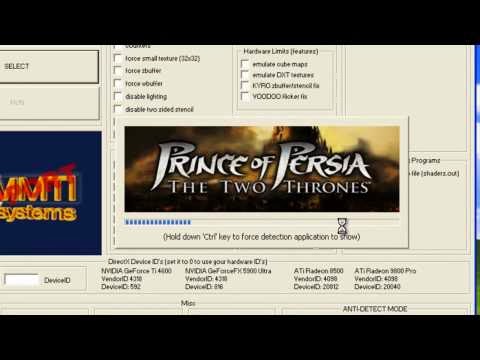
So now as you will open this tool you will see a big Select button, simply press that too choose your game file.

So make sure to navigate to the original game directory and select the .exe file of your game you wish to play.

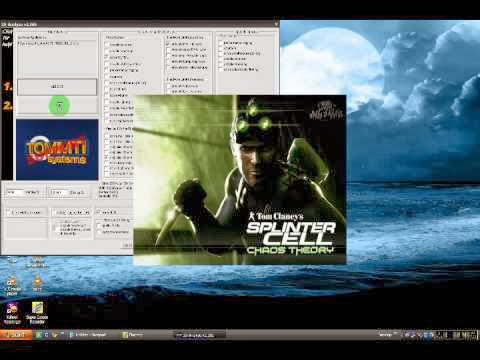
Now after selecting that game make sure to tweak settings as mentioned below in the image, just select every setting like below.

Now after configuring the whole software, just press "RUN" option and then just wait and see how your game runs automatically.

Remember You can even save the batch settings for every single using the Save Batch File! option provided below in the tool.

play-pc-games-without-graphic-card-featureupplay-pc-games-without-graphic-card-featureup

So now every single person who do not want to waste money on graphic card for a playing a single he can easily rely on this tool for making that game run pretty easily. Well but I surely recommend that if you are a gaming freak then you should have all the tools and software's required for awesome gaming experience.

Tutorial: How to gets Headphones working with Sony Xperia Z Ultra (SOLVED)

Tutorial: How to gets Headphones working with Sony Xperia Z Ultra (SOLVED)

Tutorial: How to gets Headphones working with Sony Xperia Z Ultra (SOLVED)-FeatureUp

Boy, have headphones changed in the last few years. From something that was simply a black wire that split into 2 earpieces, they’ve morphed into a plethora of options and varieties with an assortment of buttons, sliders, and connections, each meant to make your music experience a little bit more convenient. And with the addition of OEMs designing and creating earphones for specific device models, compatibility issues may arise when you plug them into a new device for the first time.

For Sony Xperia Z Ultra users, XDA Forum Member Pannam offers up a potential fix for issues with headphone / device incompatibility where certain buttons do not work on some devices. The fix basically consists of a simple tweak of a system value labelled headsethook. But first, you must install the provided keytest.apk and with it, find the numerical scancode of your headset. Once that’s done, simply change the headsethook value to the scancode of your headset. You then change the headset scancode to the original headsethook value, and install a third party headset app.

Tutorial: How to gets Headphones working with Sony Xperia Z Ultra (SOLVED)-FeatureUp

Tutorial: How to gets Headphones working with Sony Xperia Z Ultra

1. Get backup of your Sony Xperia Z Ultra before doing any process.

2. Your Sony Xperia Z Ultra must be rooted.

5. Now connect Handset to Xperia Z Ultra and open KeyTest now click any buton.

6. Scancode will appear over there notedown that code ( i.e : 257 )

7. Now Browse to system/usr/keylayout/msm8974-taiko-mtp-snd-card_Button_Jack.kl (use rootbrowser)

8. You need to search HEADSETHOOK

9. Now replace key with scancode number.

10. It should be look like this
    #original: key 226 HEADSETHOOK WAKE
    #changed: key 257 HEADSETHOOK WAKE

11. Now change the scancode number, in my case key 257 to 226 (or the key HEADSETHOOK is assigned to)

12. It should :
    #original: key 257 VOLUME_UP WAKE
    #changed: key 226 VOLUME_UP WAKE

13. One more app will reqiuired to finish process Download Headset Button ControllerTrial

14. Restart your Sony Xperia Z Ultra and Configure buttons as per your wish.

Best of Luck ! I hope it was helpful. In case if you got error or you don't know what to do next just leave one comment we would like to help our reader. -- Yes don't forget share this post with your friends.
Funny Valantine Day Quotes for Facebook Status

Funny Valantine Day Quotes for Facebook Status

Funny Valantine Day Facebook Status_FeatureUp
 

1) "True love comes quietly, without banners or flashing lights. If you hear bells, get your ears checked."

2) I married the first man I ever kissed. When I tell my children that, they just about throw up.

3) Love is an exploding cigar we willingly smoke.

4) Love is blind. Marriage is the eye-opener.

5) One advantage of marriage, it seems to me, is that when you fall out of love with him, or he falls out of love with you, it keeps you together until maybe you fall in again.

6) "The poor wish to be rich, the rich wish to be happy, the single wish to be married, and the married wish to be dead."

7) "Love is an electric blanket with somebody else in control of the switch."

8) "Lord! I wonder what fool it was that first invented kissing."

9) "Valentine's Day is when a lot of married men are reminded what a poor shot Cupid really is."

10) 'I require three things in a man. He must be handsome, ruthless and stupid.'

11) 'My boyfriend and I broke up. He wanted to get married and I didn't want him to.'

12) ‘Love is like a river, always changing, but always finding you again somewhere down the road.’

13) "Before I met my husband, I'd never fallen in love. I'd stepped in it a few times."

14) ’A kiss is an application on the top floor a job in the basement.’

15) 'Get married early in the morning. That way, if it doesn't work out, you haven't wasted a whole day.'

16) "I got a Valentine's Day card from my girl. It said, 'Take my heart ! Take my arms! Take my lips!' Which is just like her. Keeping the best part for herself."

17) ‘It takes a lot experience for a girl to kiss like a beginner.’

18) Women with pasts interest men. They hope history will repeat itself.

19) Today I already killed some helpless flowers for you… what else do you want?

20) "Love is like war: Easy to begin but hard to end"

21) "No man is truly married until he understands every word his wife is NOT saying."

22) "It does not matter what you do in the bedroom as long as you do not do it in the street and frighten the horses."

23) I love being married. It’s so great to find one special person you want to annoy for the rest of your life.

24) Some girls don't need flowers from their man, Some girls complain chocolates make them fat, Some girls do not need big romantic gestures, Please be advised that I am not like that! 
 
25) IF YOU DON’T HAVE A VALENTINE ON VALENTINE’S DAY; DON’T BE SAD. MOST PEOPLE DON’T HAVE AIDS ON WORLD AIDS DAY AS WELL
 
HAPPY VALENTINE Single-Double ;)
How to get Protection against Session Hijacking and Hackers with PHP Session

How to get Protection against Session Hijacking and Hackers with PHP Session

How to get Protection against Session Hijacking and Hackers with PHP Session_FeatureUp

When it comes to session security lot of webmasters like to skip it. By myself i use sessions and not cookies, not for any big purpose but sessions are cool, easy to implement.

Steps to session security


1- Not filtered GET, POST, REQUEST data 
2- Using session_regenerate_id() 
3- Acsepting http only cookies 
4- Manually expiring sessions 
5- Php.ini modifications 

Lets move on


To start a session we start by: 
<?php
session_start(); // it starts sessions
?>

A live example is echoing "Hello World" 
<?php
session_start();
// string to print
$string = "Hello World";
$_SESSION['string'] = $string;
// printing it out
echo $_SESSION['string'];
?>
Simple and cool :D 

Not filtered GET, POST, REQUEST data


If you are giving to a session a value from forms make sure to filter all bad charachters. 

Here is a live example of a vulnerability: 
<?php
session_start();
/* attacker using an evil javascript like:
<script>alert(0)</script>
which will popup a "0"
*/
$string = $_GET['string'];
$_SESSION['string'] = $string;
// printing it out
echo $_SESSION['string'];
?>

What happened here is that GET data are not filterd against Cross Site Scripting(XSS Attacks), think when the data get posted in mysql database and attacker executes sql injection scripts. 
Make sure this kind of data is always filtered. 

Using session_regenerate_id()


Whats all about this function ?? 
Well this function is very inportant! 

a- When you refresh the page you get a new session id 
b- When you close the browser the session gets destroyed 
c- It will prevent session stealing 

To implement it just simply do: 
<?php
session_start();
session_regenerate_id();
?>

Acsepting http only cookies


This is an php.ini function, php.ini explains it as: Whether or not to add the httpOnly flag to the cookie, which makes it inaccessible to browser scripting languages such as JavaScript. for more about it you can read on php.net 

To implement it just simply do: 
<?php
session_start();
session_regenerate_id();
// setting ini rule
ini_set('session.cookie_httponly', true);
?>

Manually expiring sessions


We can use time() to create a session when we last logged in and destroy it after X time. 
<?php
session_start();
session_regenerate_id();
// setting ini rule
ini_set('session.cookie_httponly', true);
// record last login
$_SESSION['lastlogin'] = time();
?>
When we nextly access it we do a check for expiration: 
<?php
session_start();
session_regenerate_id();
// setting ini rule
ini_set('session.cookie_httponly', true);
// check if session is more old than 20 seconds
if($_SESSION['lastlogin'] > time() - 20){
die("Session expired, please relogin.");
}
?>

Php.ini modifications


We gonna make some modifications on php.ini file. 
You can use ctrl+f to search for strings. 
session.save_path = "c:/wamp/tmp" (where the sessions will be saved)
session.gc_maxlifetime = 1440 (maximum time session will be alive)
it is good to change this 2 options or more (depending on your needs) 

Dont's


It is not a good recomandation to save sessions on a mysql database, it will slow page speed and if data is not filtered things may go bad. 

Thanks for reading, I worked alot on writing this tutorial, a bit of share of this post would be nice :D

Solution : Remove Online Ads from Android Apps

Solution : Remove Online Ads from Android Apps


Solution : Remove Online Ads from Android Apps_FeatureUp
  1. Download this file to your PC. 
  2. Now you have the file if you have downloaded the file just make sure to rename the file as "hosts" its really important.
  3. So now you have the "hosts" file that you need to place in your Android device in order to remove all those advertisements.
  4. Now just transfer this file to your android device and open your file explorer on your android device. (use a free file explorer like F-explorer)
  5. Now just copy the file on your android device and paste it in to /etc or /system/etc, now if there is already a hosts file present just rename it to hosts.bak (to create backup of older hosts file)
  6. Now just paste your new hosts file over here, make sure you have the administrative right's to paste the file.
  7. That's it guys now just reboot your android device and see this trick working.
Solution : Remove Online Ads from Android Apps_FeatureUp
 
Windows 8.1 won’t sleep

Windows 8.1 won’t sleep

Windows 8.1 won’t sleep_FeatureUp

So you’ve taken the plunge.  You’ve done the unthinkable and updated your perfectly working computer to Windows 8.1 and now some of the stuff that used to work, no longer works.
And now you find yourself in a real quagmire: you’re wondering why Windows 8.1 wants to stay awake all the time.
No matter what you do, it categorically refuses to sleep when idle.  In this article, I’m going to show you how to make your intractable PC sleep when it’s just sitting around doing nothing.  For some reason, Windows 8.1 doesn’t know when to take a break and it’ll inexorably munch on the battery until it drains the thing.  Windows 8 slept fine when idle – but in Windows 8.1, it’s like the stupid computer needs the digital equivalent of an ambien before it enters sleep mode.
(i.e. taking an ambien is tantamount to manually forcing the computer to sleep)

Quick Message
Press Esc to close
Copyright © 2013 FeatureUp All Right Reserved. The content is copyrighted to FeatureUp and may not be reproduced on other websites without permission or credit.